Review execution records and save as a Skill
This page saves a CRM workflow that already runs end to end, so the whole team can reuse it directly afterwards.
Who this is for
Sales managers, implementation engineers, and administrators.
Steps: review execution records
Run a customer follow-up or a high-risk flagging action.
Go back to the customer or opportunity detail page.
Check whether an execution result appears.
Verify the record includes:
- Operator
- Time
- What was done
- Rationale
- Notification status
Steps: save as a Skill
Enter the runtime.
Click Skills in the left sidebar.
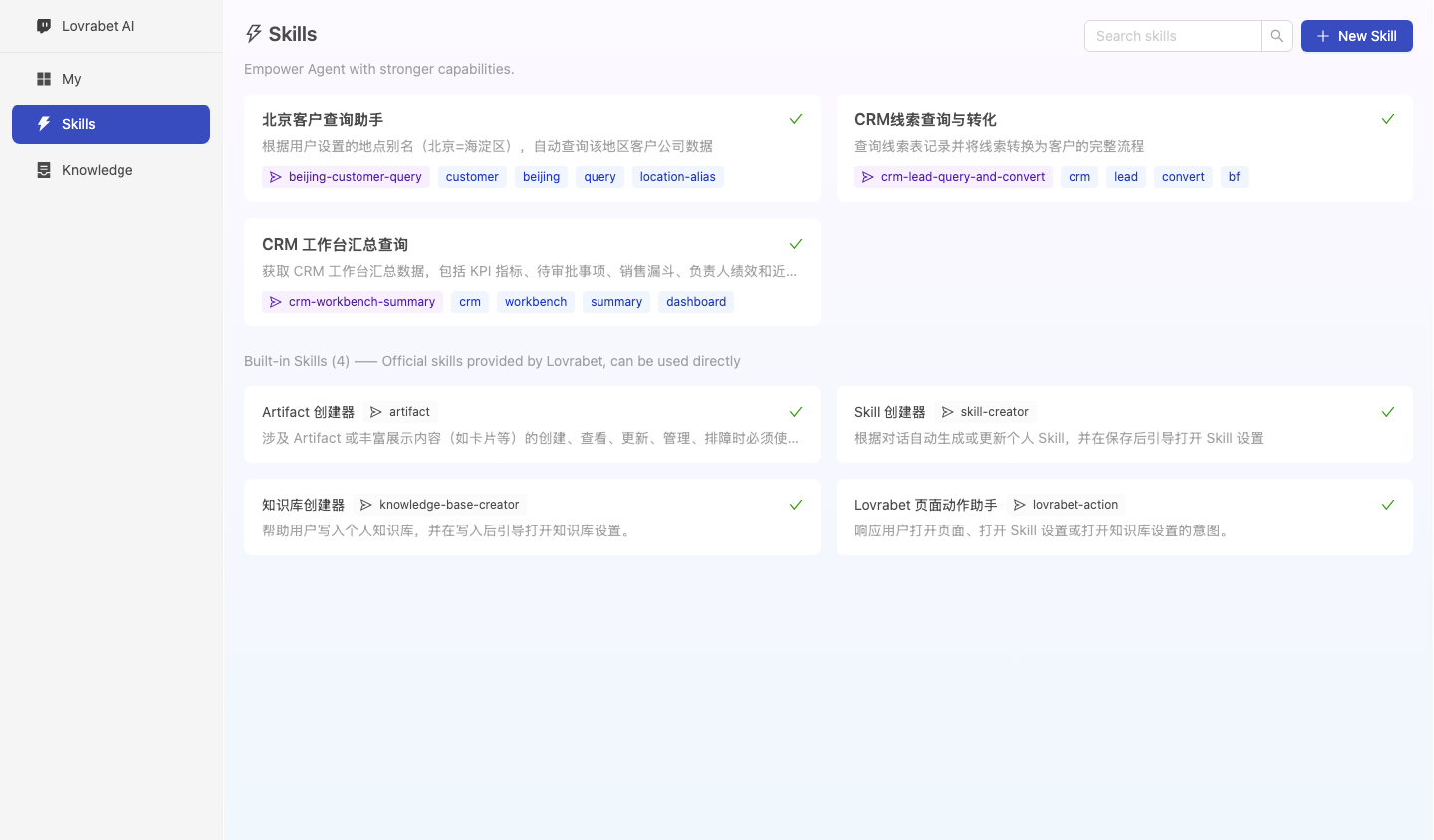
Compare with the screenshot below: you should see existing CRM Skills and a New Skill button.
Click New Skill.
Name the Skill, for example "Key CRM Account Follow-up".
Write in the fixed steps:
- Query customers with no follow-up in the last 14 days.
- Filter for customers with open opportunities.
- Output customer, owner, stage, amount, and suggested action.
- Show a preview before any write-back.
Save the Skill.
Return to the runtime and click the Skill to run it once.
Screenshot reference: the runtime Skills entry is shown below. Saved CRM workflows appear here.
Example Skill content
# CRM 重点客户跟进

## 输入
- 时间范围
- 团队或负责人

## 步骤
1. 查询最近 14 天未跟进客户。
2. 筛选进行中的销售机会。
3. 输出客户清单和建议动作。
4. 需要写回时展示预览,等待确认。

## 输出
- 客户名称
- 负责人
- 最近跟进时间
- 销售机会阶段
- 预计金额
- 建议动作
How you know it's done
- Execution records are visible on customer detail pages.
- The new Skill appears in the Skills list.
- Clicking the Skill reproduces the same type of CRM task.
- The Skill's output format is stable.
If the Skill drifts
| Symptom | Fix |
|---|---|
| Output fields are unstable | Fix the output fields in the Skill |
| Query scope is wrong | Make the time range explicit in the inputs |
| Write-back fires too early | Add preview and confirmation steps |
| Business definitions change | Update the Skill content and the related Knowledge |
Claude Code prompt
请使用 rabetbase 检查目标应用中已经可以被 Skill 调用的稳定能力。
执行 rabetbase sql list --appcode <你的应用 appCode> --format compress。
执行 rabetbase bff list --appcode <你的应用 appCode> --format compress。
执行 rabetbase dataset list --appcode <你的应用 appCode> --format compress。
根据结果输出一份 Skill 草稿,包含输入、步骤、调用能力名称、输出字段和写回确认点。
本轮只读,不创建 Skill。
Next steps
Continue to "4. View linked customer, opportunity, and order data".