FAQ
The CRM app isn't visible
Check whether your account has access to the target app. If you can enter the runtime but not App Management, request app admin permissions.
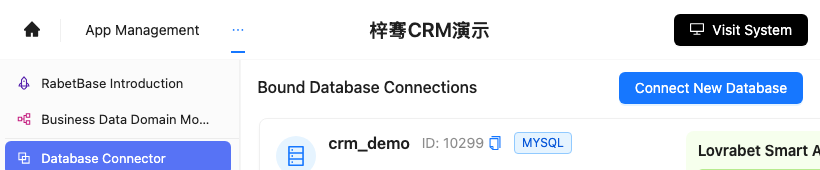
crm_demo isn't in Database Connector
Check whether the database is bound to the current app. Once binding is done, check the smart analysis status.
Screenshot reference: the database connection entry is shown below. When troubleshooting, first confirm the database and analysis status.
Dataset Overview shows no datasets
Check whether the smart analysis has finished. Refresh Dataset Overview once the analysis completes.
System data query results are wrong
Check three places:
- Customers and follow-up records are related.
- The last follow-up time field is correct.
- The opportunity stage uses the correct enum values.
The detail page has no follow-up history
Open Dataset Overview and check the relation fields between customer information and follow-up records.
A business write-back service fails
First check whether the preview looks correct. On field validation failures, check the required fields; on partially completed writes, move the multi-table write into a Backend Function and return the failed datasets, fields, and reasons.
Agent output has no evidence
Ask for the field sources in the output:
请列出每个结论对应的数据来源和筛选条件。Skill results differ on every run
Fix the inputs, steps, and output fields in the Skill. Move stable statistics to SQL, complex orchestration to BFF, and write-back to Backend Functions.
SQL returns no data
Check the parameters, time range, table names, field names, and permission filters.
BFF execution fails
Check the BFF name, input parameter format, and publish status.
Backend Function write-back fails
Check the Function logs, permissions, required fields, transactions, and notification settings.
Dashboard numbers don't match business expectations
Go back to "9. Standardize multi-table metric definitions" and check each metric's data source, filter conditions, and calculation method.
Claude Code troubleshooting prompt
请使用 rabetbase 排查目标应用当前问题。
先执行 rabetbase doctor --format compress。
再根据问题类型选择:
- 数据库问题:rabetbase db list --appcode <你的应用 appCode> --format compress
- 数据集问题:rabetbase dataset list --appcode <你的应用 appCode> --format compress
- 关系问题:rabetbase dataset links --appcode <你的应用 appCode> --format compress
- SQL 问题:rabetbase sql list --appcode <你的应用 appCode> --format compress
- BFF 问题:rabetbase bff list --appcode <你的应用 appCode> --format compress
输出问题现象、已执行命令、命令结果摘要和下一步检查命令。
本轮只读。